
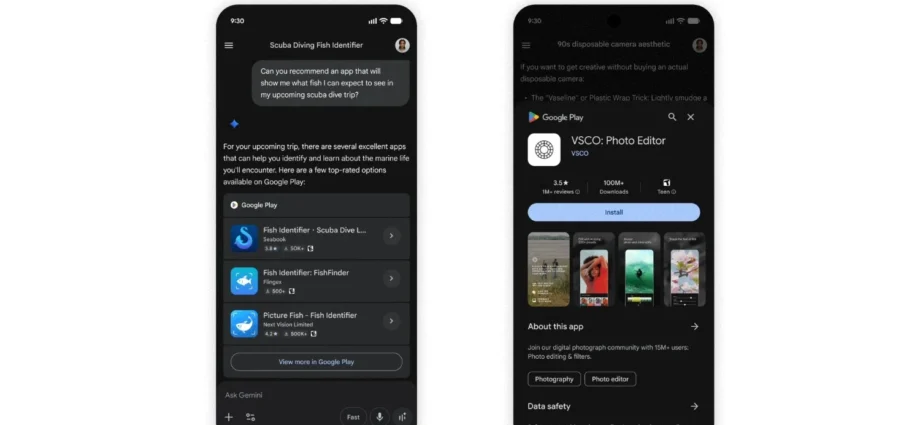
The capabilities of Google Gemini keep on expanding, and with that the possibilities for what it can be used for also grow. One of the latest tools to land in the AI’s arsenal is the ability to find and install Android apps.
Google is pitching this as a conversational way to track down and install apps without having to manually search through the Play Store.
In an announcement posted to the Gemini support pages, Google says: “We’re thrilled to announce a brand-new way to discover your next favorite app, game, or digital item: the Google Play connected app for Gemini on Android. Now, finding and installing the perfect app is as simple as having a conversation”.
The company goes on to say:
The Google Play connected app for Gemini evolves how you discover apps. By bringing the power of Google Play directly into your conversational assistant, Gemini makes new tools and games that are now more intuitive. After connecting Google Play to your Gemini app on Android, you can easily use Play to discover, find, and install apps, as well as make in-app purchases—all through your conversation.
Google then suggests a few ways in which the feature can be used:
 Discover apps conversationally: Not sure exactly what you need? Just describe your goal! Try asking, “Recommend a good map app for my phone to download while I’m traveling internationally,” or “Find a productivity app to help me with meal planning.”
 Get direct install links: Specify the app you want by asking Gemini to “Install [App Name]” or “Download [Game Name].” Simply tap the app in your chat to open its details page on Google Play and complete your installation.
  Shop for in-app items & gift cards: Additionally, you can search for and purchase digital items for select apps already on your phone. You can even purchase gift cards. Try asking, “Show me in-app purchases for [App Name]” or “Buy a Google Play gift card.”