
Windows 11 version 26H2 is now more widely available on all supported systems.
At the end of September 2026, Microsoft made the latest feature update for Windows 11, with version 26H2, generally available. At the time the update rolled out in the typical phased manner, as in, it was not made immediately available to all users and was released gradually to eligible systems. This is done so that in the case of any major issue, it would not adversely impact a large number of systems altogether, a situation that can be especially bad in the case of enterprises.
If you upgrade to Windows 11 26H2, expect lower memory usage and a snappier PC, especially if you use certain third-party apps that can really strip down the OS to its most fundamental bits.
A few days ago, Microsoft confirmed that the phased rollout of 26H2 hit a milestone as phased rollout reached full availability for devices running Windows 11 25H2 and 24H2. Following that, Microsoft has now made Windows 11 26H2 on all eligible systems, including those on Windows 10, that’s currently on extended support.
As you can see in the image below, on my Windows 10 device, the company is offering Windows 11 26H2 now via the Windows Update channel.
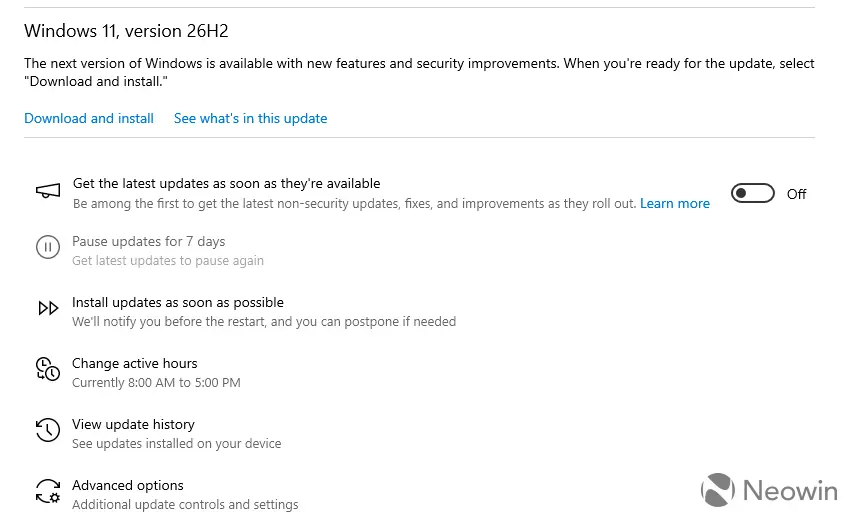
The company writes: “Current status as of October 28, 2026: Windows 11, version 26H2 is now available for all eligible devices. This new version contains all the recently announced features in Windows 11, versions 25H2 and 24H2, and will be delivered using servicing technology, providing a fast installation experience.“
If, for some reason, you still don’t have 26H2 being offered on your system despite having the “Get the latest updates as soon as they’re available” toggle enabled inside the Settings, the easiest way to upgrade is to simply manually download the eKB5121794 enablement package from this dedicated article which simply enables the features on 26H2 as they lay in a, sort of, dormant state on 25H2 and 24H2 systems. This will let you perform a simple in-place upgrade to the latest feature update from 24H2 or 25H2, though this of course means you must already be on a certain build, and won’t work on older Windows 11 versions or from 10. Besides that, a dedicated upgrade utility is also available.