
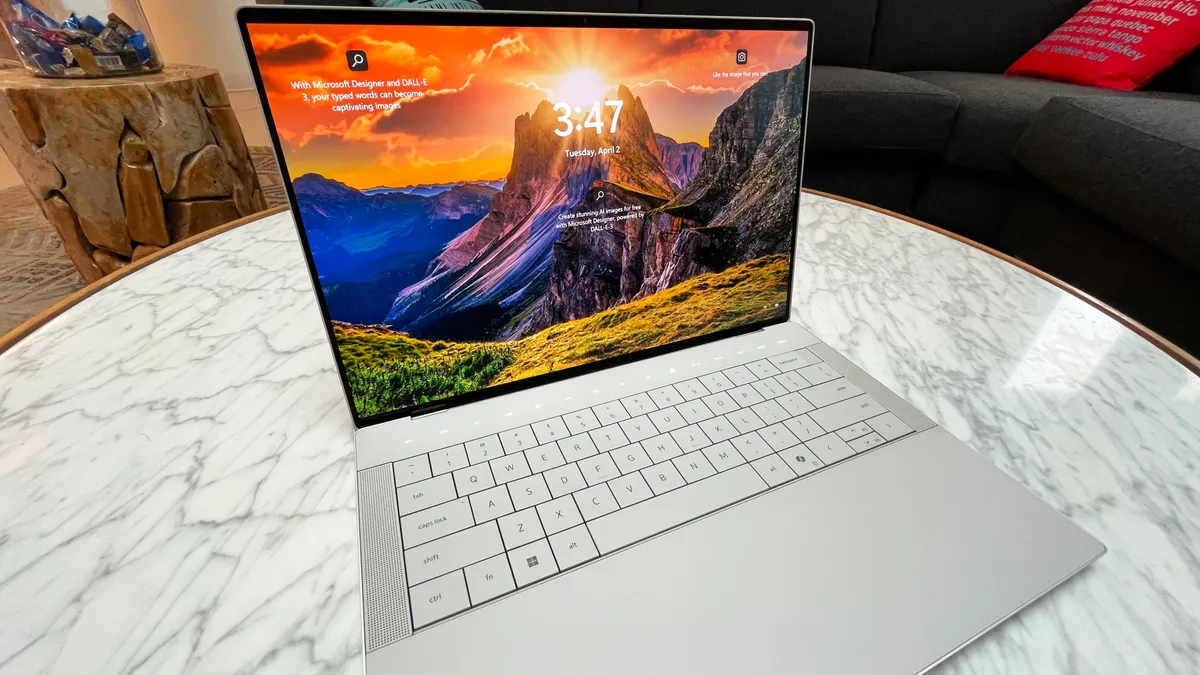
The Dell XPS 14 is a stylish, high-performance laptop praised for its sleek aluminum design, powerful Intel Core Ultra processors, and optional NVIDIA RTX 4050 GPU, making it suitable for both productivity and light creative work. Key features include a stunning OLED display option, a minimalist touch function row instead of physical keys, and a large haptic trackpad. However, the design has trade-offs, such as sharp edges and a lack of tactile feedback on the function row, while the port selection is limited and requires adapters.
Pros
- Stunning design: The laptop features a high-end, futuristic, and minimalistic aesthetic with an all-aluminum chassis. It is available in Platinum and Graphite colorways.
- Powerful performance: Equipped with an Intel Core Ultra 7 processor and an optional NVIDIA GeForce RTX 4050 GPU, the XPS 14 handles demanding workloads like video editing and 3D animation. The CPU performs well for everyday tasks, with reviewers noting minimal thermal throttling despite its compact size.
- Vibrant display options: The 14.5-inch screen offers two options: a 1920 x 1200 FHD+ IPS panel or a 3.2K (3200 x 2000) OLED touchscreen. The OLED is particularly noted for its high contrast, deep blacks, and excellent color accuracy (100% DCI-P3), making it ideal for creative work.
- Excellent webcam: The 1080p webcam provides sharp, clear, and well-exposed video for video calls. It also features an IR sensor for Windows Hello facial recognition.
- Solid build quality: The laptop’s CNC-machined aluminum body feels sturdy with almost no flex. Its finish is resistant to fingerprints on the Platinum model, though the Graphite version may show them more.
Cons
- Controversial keyboard and touchpad: The “zero-lattice” keyboard has flat, tightly-packed keys with shallow travel, which some reviewers found mushy and uncomfortable. The seamless, invisible trackpad is aesthetically pleasing but can be unintuitive and difficult to locate by touch. The capacitive touch function row, which replaces physical F-keys, lacks tactile feedback and can cause user frustration.
- Limited ports: The XPS 14 features a minimal selection of ports, including only three Thunderbolt 4 (USB-C) ports and a microSD card slot. There are no built-in USB-A or HDMI ports, though a dongle for these is included.
- Underwhelming gaming performance: Although the optional RTX 4050 provides a graphics boost, it is a low-wattage variant (30-40W TGP) constrained by the laptop’s slim form factor. This limits its performance significantly compared to gaming-focused machines, making it suitable for only light gaming.
- Soldered RAM: The laptop’s RAM is soldered directly onto the motherboard to maximize speed, meaning it is not user-upgradable.
- Lackluster audio: While the quad-speaker system is loud, reviewers noted a lack of bass and a tinny, unpleasant sound at higher volumes.
Design and display
- Aesthetics: The laptop has a premium, minimalist design with a sturdy aluminum build and slim bezels.
- Display: A 3200×1200 120Hz OLED touchscreen is available, offering excellent colors and contrast, but some users find the brightness not competitive with all other high-end laptops.
- Portability: It’s relatively thin, but some reviews note it’s heavier than other 14-inch laptops.
Performance and battery
- Processor: Equipped with Intel Core Ultra processors, it handles demanding workloads like multitasking and photo editing efficiently.
- Graphics: An optional NVIDIA RTX 4050 GPU provides extra graphical power for tasks like video editing, but it can impact battery life.
- Battery: Battery life is generally good for practical use, but it takes a hit when the dedicated GPU is active.
Keyboard and trackpad
- Keyboard: The keyboard has quiet, large keys, but the lack of physical function keys and the haptic-only function row can be challenging to adapt to and may slow down workflows.
- Trackpad: The large, haptic trackpad is generally accurate and responsive.
Other features
- Ports: Connectivity is limited to USB-C ports (Thunderbolt 4), requiring adapters for older devices like USB-A and HDMI.
- Webcam: The 1080p camera includes AI features for enhanced video calls.
- Storage: The SSD is upgradeable, but the RAM is not.
Key takeaways
For users who value a premium, eye-catching design and strong performance for productivity and creative tasks, the Dell XPS 14 (9440) is a compelling option. The brilliant 3.2K OLED display is a particular highlight for visual work.
However, be prepared for significant adjustments to the non-traditional keyboard and haptic trackpad. For users who prioritize ergonomic functionality or need extensive port options without a dongle, the design choices may be a dealbreaker. If gaming is a priority, more powerful and affordable alternatives exist.