
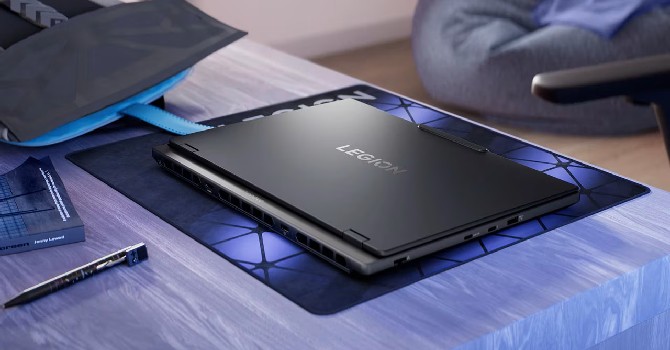
I was impressed with this midrange gaming laptop’s 3D performance, but its vibrant, surprisingly bright OLED display puts it over the top.
Pros
- 2.5K OLED display is crisp, bright and fast
- Snappy keyboard feels fast for games
- Thin and light for its size
- Free M.2 slot to add second SSD
Cons
- Short battery life
- No biometrics for easy, secure logins
- Lacks fast Thunderbolt 4 or USB4 ports
- Always-on power button LED is annoying
The Lenovo Legion 5i Gen 10 is overkill for most budget gaming laptop shoppers, both in terms of price and features. But if you view it as two laptops in one — a competent gaming laptop with a reasonably large 15.1-inch display and a general-use laptop that’s thin and light enough to carry around more than occasionally.
Lenovo Legion 5i Gen 10 performance
Following the Acer Nitro V 16S AI and MSI Katana 15 HX, the Legion 5i Gen 10 is the third gaming laptop I’ve tested with an Nvidia GeForce RTX 50-series GPU. The MSI machine is a true budget laptop, priced at just $999, with entry-level RTX 5050 graphics and an old-school 15.6-inch display. At $1,300, the Acer entry sits between the MSI and the Legion 5i Gen 10 and supplies a larger 16-inch display powered by an AMD Ryzen 7 260 and RTX 5060 graphics.
The Legion 5i Gen 10 bested them both in testing, and a big reason why it finished ahead of the Acer on all but one of our benchmark tests was that its RTX 5060 is set to run at its full 115 watts while Acer throttles its GPU, limiting it to 85 watts. And even with the high-powered Core i7-14700HX and full-wattage RTX 5060, the Legion 5i wasn’t any louder than the Acer. Among gaming laptops, both were on the quiet side. The Legion 5i Gen 10’s two cooling fans kept the laptop cool under load without getting too loud. I wouldn’t describe them as “whisper quiet,” but I’ve heard worse.
After acing our application tests, the Legion 5i Gen 10 proceeded to net excellent results on our 3D graphics and gaming benchmarks, as you can see below. It bested both the Acer Nitro V 16S AI and MSI Katana 15 HX on every test with the exception of one of our newest gaming tests. On the built-in benchmark of Assassin’s Creed: Shadows, which we run at 1,920×1,080-pixel resolution with the High preset, the Legion 5i Gen 10 finished a single frame per second behind the Nitro V 16S, but still managed to keep its average frame rate above 60fps for smooth gameplay.
The Legion 5i Gen 10’s gaming success requires a sacrifice in battery life. Despite featuring a big, 80-watt-hour battery, it lasted less than 5.5 hours on our YouTube streaming battery drain test. That’s a poor result even among gaming laptops. The bright, high-res OLED display also doesn’t do any favors for the laptop’s battery life. The Legion 5i Gen 10 is certainly a laptop that doesn’t allow you to stray from a power outlet for very long, but the excellent performance and awesome OLED display will be worth the trade-off in battery life for many gamers and creators.

Gaming laptop in disguise
This Legion is about as thin and light as it gets for a gaming laptop. Some budget laptops like the MSI Katana 15 HX feature dated 15.6-inch, 16:9 displays, but more commonly, you’ll find 16-inch, 16:10 displays, as with the Acer Nitro V 16S AI. The Legion 5i offers a compromise, supplying a modern 16:10 aspect ratio but in a more compact 15.1-inch size.
I’ll get to the display itself shortly, but the benefit of sacrificing a bit of screen size — while still getting plenty of space from top to bottom for seeing more on the screen and scrolling less when reading, browsing or working — is greater portability. The Legion 5i Gen 10 weighs 4.3 pounds, which is less than the 4.6-pound Nitro V 16S AI and the 5.6-pound Katana 15 HX. This is the rare gaming laptop that I wouldn’t mind carrying with me on something approaching a daily basis. But you’ll need to lug the hefty power brick along with you, given the short battery life. And the power brick is the typical anchor you get with a gaming laptop; the power cord and brick add 1.5 pounds to your bag, putting the total travel weight at 5.8 pounds.
It’s not a plastic hulk like some budget gaming laptops, but it is trim and rigid. The keyboard deck and bottom panel are plastic but have a firm feel. The lid is made from aluminum, giving it a bit more of an upscale look and feel.

If you want to tote the Legion 5i around as your do-it-all laptop, it won’t look out of place whether you’re working in an office, shared workspace, coffee shop or gaming at a friend’s house or school lounge. The laptop comes dressed in business black and lacks the aggressive venting and sculpted plastic flourishes found on many gaming laptops. Other than the Legion name on the lid, which other gamers might recognize, the only gaming-centric part of the overall design is the Eye of Sauron power button, whose white LED lighting is nearly always on. (This motif is repeated in the “O” in the Legion branding on the lid as well as the icon on the “O” key.)
The power button remains illuminated when the Legion 5i Gen 10 is on, only turning off when you power off the laptop and pulsing when the laptop dips into sleep mode. You’re given great control over the keyboard’s RGB backlighting, but I found nothing for turning off or even dimming the power button’s LED. And its shine is bright, especially in a dark room.
When you turn on the Legion 5i Gen 10’s RGB keyboard backlighting, it suddenly looks like a gaming laptop. Most budget and midrange gaming laptops provide single-zone or four-zone RGB lighting at best, but the Legion 5i Gen 10 serves up an impressive (on paper) 24 zones. In practice, the effect of this 24-zone RGB LED keyboard is muted. The zones are vertical strips, and the RGB effects and patterns don’t look all that different flowing over these skinny columns as they do on a four-zone keyboard. The gap between typical four-zone RGB lighting and the 24 zones you get here is much smaller than it is going from these 24 zones to per-key RGB lighting, where you can really dial in your intended effect.

The keys themselves are very firm, which makes the keyboard feel fast when you’re mashing keys during a frantic scene in a game because they snap back quickly. I prefer a slightly softer feel with shallower travel for typing. The touchpad is a bit undersized, but I liked its firm click response. The touchpad is centered below the keyboard, which is off-center to accommodate a numberpad. More than the numpad, I was excited to see four full-size arrow keys on the keyboard.
I was also excited to find a free M.2 slot when I removed the bottom panel. Having a second M.2 slot means you can expand the laptop’s storage without replacing the primary SSD. The Legion 5i Gen 10 has a 1TB SSD, which is roomy for most laptops, but many of today’s games have huge file sizes, so having an easy route to expansion is always appreciated on a gaming laptop.

Outstanding OLED
The Legion 5i Gen 10’s OLED wins the Triple Crown for displays: a high resolution for crisp text and images, a speedy refresh rate for smooth movement and a high peak brightness that allows colors to pop. It’s one of the best laptop displays I’ve ever seen.
The 2.5K resolution is perfect for the size because it allows for a sharp picture without being overkill and shortening the battery life even further. You don’t need a 4K resolution on a 15.1-inch display.
The 165Hz refresh rate allows for smooth gameplay. Higher-end gaming laptops provide even faster displays, but you’re unlikely to hit more than 165fps in most games on the RTX 5060-powered Legion 5i Gen 10, so the 165Hz OLED panel more than suffices.

OLED panels are able to produce effectively zero-nit black levels because individual pixels can be turned completely off, resulting in incredible contrast. Because of this, they don’t need to get as bright as an LCD to produce a great-looking picture. The Legion 5i Gen 10 must have missed the memo about OLED having limited brightness. It achieved a peak brightness of 518 nits on my tests with a Spyder X colorimeter when the brightest OLED laptops typically top out around 400 nits. And the Legion 5i Gen 10 excelled on my color accuracy tests, covering 100% of the sRGB and P3 gamuts and, more impressively, 99% of the larger AdobeRGB color space.
The webcam sits in a little bump-out above the display. The good news is that it’s a 1440p cam that produces a much crisper, cleaner and better-balanced picture than the 720p cams on the Acer Nitro V 16S AI and MSI Katana 15 HX. The bad news is that it lacks an IR sensor for using Windows Hello facial recognition. Without a fingerprint reader, the Legion 5i Gen 10 is devoid of biometrics for easy, secure logins.
The laptop’s 2-watt stereo speakers are also lacking. They produce passable audio but don’t have the full sound you’ll want for games. Keep your headphones handy.

The Legion 5i Gen 10 has plenty of ports, but none of them are fast. The two USB-C ports offer only 10Gbps transfer speeds, which is only a fraction of the 40Gbps you get with Thunderbolt 4.
Is the Lenovo Legion 5i Gen 10 worth buying?
Yes! It provides great performance for the price, and its OLED display is outstanding. It’s a great pick for gamers, but it’s more than just a gaming laptop. Creators engaged in color-accurate work will love the bright, high-res OLED display and the laptop’s portability relative to other gaming laptops. For everything it can do, the Legion 5i Gen 10 is a great value at less than $1,600.
Geekbench 6 CPU (multi-core)
Lenovo Legion 5i 15IRX1017711MSI Katana 15 HX B14W14587HP Victus Gaming Laptop 1613501Acer Predator Helios Neo 16 PHN16-7113312Acer Nitro V 16S AI12787MSI Cyborg 15 A13VE11871Acer Nitro 16 AN16-41-R3ZV10642Lenovo LOQ 15APH88212Note: Longer bars indicate better performance
Geekbench 6 CPU (single-core)
Lenovo Legion 5i 15IRX102895MSI Katana 15 HX B14W2738Acer Nitro V 16S AI2607Acer Nitro 16 AN16-41-R3ZV2587Lenovo LOQ 15APH82428Acer Predator Helios Neo 16 PHN16-712422HP Victus Gaming Laptop 162394MSI Cyborg 15 A13VE2363Note: Longer bars indicate better performance
Cinebench 2024 CPU (multi-core)
Lenovo Legion 5i 15IRX101407MSI Katana 15 HX B14W1220Acer Nitro V 16S AI867Note: Longer bars indicate better performance
Cinebench 2024 CPU (single-core)
Lenovo Legion 5i 15IRX10121MSI Katana 15 HX B14W117Acer Nitro V 16S AI104Note: Longer bars indicate better performance
PCMark 10 Pro Edition
Lenovo Legion 5i 15IRX108056Acer Nitro 16 AN16-41-R3ZV7660Acer Nitro V 16S AI7509Lenovo LOQ 15APH87441HP Victus Gaming Laptop 167038MSI Katana 15 HX B14W7024Acer Predator Helios Neo 16 PHN16-716600MSI Cyborg 15 A13VE6541Note: Longer bars indicate better performance
3DMark Fire Strike Ultra
Lenovo Legion 5i 15IRX108015Acer Nitro V 16S AI6413MSI Katana 15 HX B14W6285Acer Predator Helios Neo 16 PHN16-714802Acer Nitro 16 AN16-41-R3ZV4541Lenovo LOQ 15APH84534HP Victus Gaming Laptop 164268MSI Cyborg 15 A13VE3687Note: Longer bars indicate better performance
Shadow of the Tomb Raider (Highest @ 1920 x 1080)
Lenovo Legion 5i 15IRX10172MSI Katana 15 HX B14W155Acer Nitro V 16S AI143Acer Predator Helios Neo 16 PHN16-71136Acer Nitro 16 AN16-41-R3ZV126Lenovo LOQ 15APH8116HP Victus Gaming Laptop 16107MSI Cyborg 15 A13VE75Note: Longer bars indicate better performance
Guardians of the Galaxy (High @1920 x 1080)
Lenovo Legion 5i 15IRX10195Acer Predator Helios Neo 16 PHN16-71165MSI Katana 15 HX B14W159HP Victus Gaming Laptop 16141Acer Nitro V 16S AI133Acer Nitro 16 AN16-41-R3ZV128MSI Cyborg 15 A13VE100Lenovo LOQ 15APH890Note: Longer bars indicate better performance
The Riftbreaker GPU (1920 x 1080)
Lenovo Legion 5i 15IRX10306.68MSI Katana 15 HX B14W231.99Acer Nitro V 16S AI217.77Acer Predator Helios Neo 16 PHN16-71217.55HP Victus Gaming Laptop 16198.06Lenovo LOQ 15APH8195.12Acer Nitro 16 AN16-41-R3ZV193.65MSI Cyborg 15 A13VE143.9Note: Longer bars indicate better performance
Assasin’s Creed Shadows (1920×1080 @ High)
Acer Nitro V 16S AI62Lenovo Legion 5i 15IRX1061MSI Katana 15 HX B14W53Note: Longer bars indicate better performance
F1 24 (1920×1080 @ Ultra High)
Lenovo Legion 5i 15IRX1082Acer Nitro V 16S AI74MSI Katana 15 HX B14W63Note: Longer bars indicate better performance
Online streaming battery drain test
Acer Nitro 16 AN16-41-R3ZV9:58HP Victus Gaming Laptop 169:37Acer Nitro V 16S AI8:32Lenovo LOQ 15APH88:05MSI Katana 15 HX B14W6:14Acer Predator Helios Neo 16 PHN16-716:31Lenovo Legion 5i 15IRX105:25MSI Cyborg 15 A13VE5:10Note: Longer bars indicate better performanc
System configurations
| System configurations | |
|---|---|
| Lenovo Legion 5i 15IRX10 | Windows 11 Home; Intel Core i7-14700HX; 32GB DDR5 5,600MHz RAM; Nvidia GeForce RTX 5060 graphics @ 115W; 1TB SSD |
| Acer Nitro V 16S AI (ANV16S-41-R2AJ) | Windows 11 Home; AMD Ryzen 7 260; 32GB DDR5 5,600MHz RAM; Nvidia GeForce RTX 5060 graphics @ 85W; 1TB SSD |
| MSI Katana 15 HX B14W | Windows 11 Home; Intel Core i7-14650HX; 16GB DDR5 5,600MHz RAM; Nvidia GeForce RTX 5050 graphics @ 115W; 512GB SSD |
| Acer Nitro V 16S AI | Windows 11 Home; AMD Ryzen 7 260; 32GB DDR5 5,600MHz RAM; Nvidia GeForce RTX 5060 graphics @ 85W; 1TB SSD |
| HP Victus 16-r0097nr | Windows 11 Home; Intel Core i7-13700H; 16GB DDR5 5,200MHz RAM; Nvidia GeForce RTX 4050 graphics @ 120W; 1TB SSD |
| Acer Predator Helios Neo 16 PHN16-71 | Windows 11 Home; Intel Core i5-13500HX; 16GB DDR5 4,800MHz RAM; Nvidia GeForce RTX 4050 graphics @ 140W; 512GB SSD |
| Acer Nitro 16 AN16-41-R3ZV | Windows 11 Home; AMD Ryzen 5 7640HS; 16GB DDR5 5,600MHz RAM; Nvidia GeForce RTX 4050 graphics @ 140W; 512GB SSD |
| Lenovo LOQ 15APH8 | Windows 11 Home; AMD Ryzen 7 7840HS; 8GB DDR5 5,600MHz RAM; Nvidia GeForce RTX 4050 graphics @ 95W; 512GB SSD |
| MSI Cyborg 15 A13VE | Windows 11 Home; Intel Core i7-13620H; 16GB DDR5 5,200MHz RAM; Nvidia GeForce RTX 4050 graphics @ 45W; 512GB SSD |